Key features of the 2019 Toyota Highlander
Key features of the 2019 Toyota Highlander

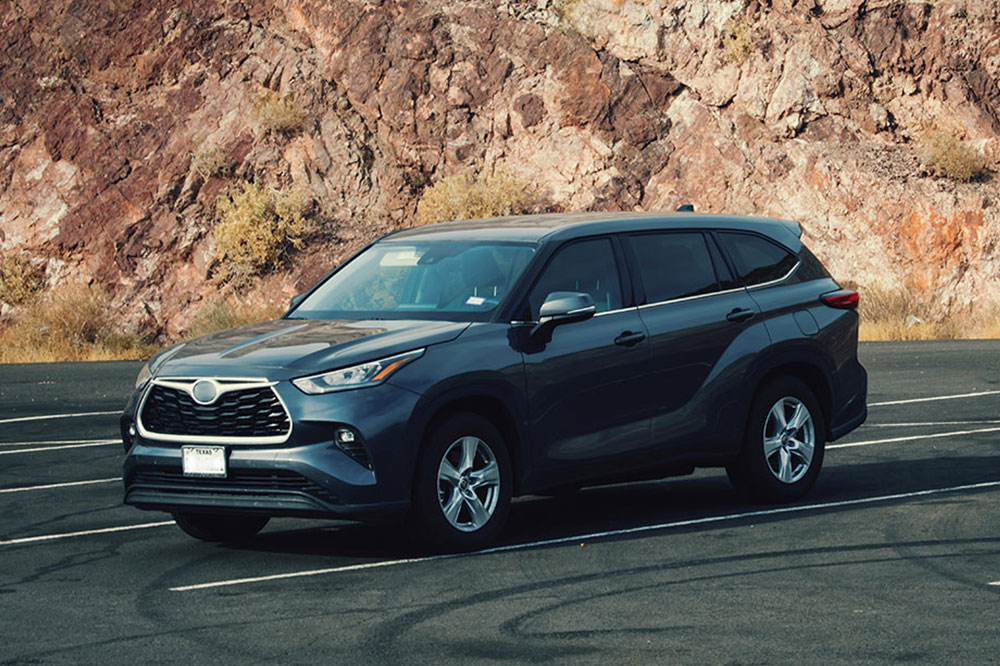
Despite the launch of its 2020 variant, the 2019 Toyota Highlander remains one of the most popular midsize three-row SUVs in the market. Complete with a sturdy exterior, high-end interior, and the masterful Toyota craftsmanship that is present throughout, the SUV is among the first choices for everything from family adventures to running an errand. If you’re planning to buy the 2019 Toyota Highlander, then here are some important features and specifications that you should know about:

Performance features

The 2019 Toyota Highlander is a classic blend of spacious comfort and stylized innovation that most buyers look for in an SUV. With 44.2 inches of legroom in the front row and 38.4 inches of legroom in the second row, the interior is comfortable, luxurious, and makes riding in style a reality. All trim variants of the Highlander are powered by a 3.5-liter V6 engine, except the base model LE, which is equipped with a 2.7-liter, four-cylinder engine. It features tie-down hooks and cargo lights to help you easily load and unload stuff. The SUV is also packed with many useful features such as high-beam headlights and radar cruise control to ensure the safety of passengers.

Safety features

Talking about safety, the 2019 Toyota Highlander is loaded with standard and innovative safety features. All trim variants of the 2019 Highlander are equipped with Toyota Safety Sense P (TSS-P), which includes pedestrian detection, autonomous emergency braking, and lane-departure warning signal with automatic steering correction. Buyers also have the option to upgrade the SUV to include the Toyota Safety Connect, which has features such as roadside assistance, or the Star Safety System, which includes multiple state-of-the-art safety features.

Technological features

Along with several basic technological features that are standard across SUVs today, the 2019 Highlander gives you the option to include more as per your preference. The interior comes with three-zone climate control to maintain the perfect temperature inside. The SUV is also equipped with Toyota Entune™, which provides infotainment through an eight-inch touch-screen display to make the drive a lot more fun.

Trim variants

Some of the trim levels that the 2019 Toyota Highlander offers are:

LE: This one is available in a 2.7-liter, four-cylinder engine with front-wheel drive. It can be upgraded to an all-wheel drive with a 3.5-liter V6 engine. It has an integrated back camera, USB ports, Toyota Safety Sense™, and other standard features. s

LE Plus: In addition to the basic features, the LE Plus comes with three-zone automatic climate control, SiriusXM® Satellite Radio, SofTex®-trimmed seats, a height-adjustable liftgate, and many more features.

XLE: It comes with features such as the Smart Key system, Entune™ multimedia system with an integrated suite of applications, and more. The 3.5-liter V6 engine remains standard across all variants except the LE.

SE: This variant features alloy wheels that measure 19 inches. Available in both front-wheel drive and all-wheel drive formats, it comprises LED headlights and many other features.

Limited : This comes with features such as a blind-spot monitor (BSM), rear cross-traffic alert (RCTA), and heated and ventilated front seats, among others.


Popular Reads

6 important benefits of using 1Password

6 important benefits of using 1Password

Many websites ask customers and businesses to create password-protected accounts to use certain services. These include social media apps, OTT platforms, e-mail applications, and more. However, remembering passwords, especially when users create over a hundred accounts, is not easy. What’s more, the data is often vulnerable to malicious attacks. That’s where one should consider using 1Password, a private, secure, and user-friendly password management software. Here are the features customers or businesses get with 1Password. Clipboard management Users often copy a password to the clipboard and forget about it, leaving the system vulnerable to others who can access their data with a simple “copy” and “paste.” With Clipboard management, the software can be programmed to remove passwords from a clipboard automatically. Deleting sensitive information from the clipboard also ensures that the third-party app does not store sensitive data. Auto-lock Users often forget to lock their system when they are away from their work desk, thus leaving their system vulnerable to other individuals. Here’s where 1Password can also automatically lock the device when a user is away to safeguard sensitive information. Secure remote password It is a common practice for most websites to send passwords to servers when a user attempts to sign in.
6 tips to pick the right business management software

6 tips to pick the right business management software

Running a business involves dealing with lots of data, like finance figures, employee information, and logistics details. Handling this data manually can become tedious and daunting and may even lead to errors. That’s why ventures of all sizes prefer business management software, which can help centralize information from various departments to streamline process control. For businesses that require assistance selecting a software solution, here are six tips to help with that decision. Understand the company’s requirements One must first understand the company’s requirements to find the precise software. The individual must determine what aspects of the business require software integration. These could include finance, logistics, customer relationship management (CRM), invoicing, or email marketing. One should pick software that meets all the company’s needs. Consider ease of use Some business management software solutions have a clustered interface. Such an interface could make it difficult for the business to operate because it will have to train new staff continuously to use the software. So, one must pick an option that offers top-notch features and integrates beautifully into a simple, easy-to-operate interface. Compare features One must check the features of different software before choosing. The best ones will have various features, from primary inventory management to complex accounting functions.
6 advantages of cloud-based management software

6 advantages of cloud-based management software

Workspaces are constantly evolving these days, with many organizations shifting to a remote or hybrid work environment. This change has been supported by the rise of cloud computing, such as cloud-based business management software, project management software, accounting software, and more. Cloud computing has transformed data storage and access, resulting in increased flexibility and scalability. Read on to learn more about how businesses can gain by shifting to cloud-based management software. Better access to data With many companies shifting to hybrid work styles, making data available to the employees for seamless functioning is important. Cloud-based business management software enables this shift. It allows one to access company data from any device connected to the internet by logging into the online hub. People can collaborate and work in real-time across the world without having to constantly update each other or share details personally, improving overall productivity. Additionally, this software allows businesses to put multiple authorization checks in place to limit the number of people who have access to certain sensitive data. Improved job satisfaction Cloud-based management software makes managing projects easier, reducing the administrative workload on the team. This allows employees to have greater autonomy and responsibility for their work, which helps improve productivity, job satisfaction, and employee retention in the long run.
